


Language people can use
Assistants and document tools that answer from your content and hand off when a person should take over.
Production AI for the work your teams already do.
Acesoft designs and ships machine learning, language and vision applications around your operations. Each build connects to the systems you run today, and we evaluate it before it goes live.
A managed way of delivering software, from the first workshop through support.
Security protocols and encryption, so confidential client data stays confidential.
Teams serving Canada, the USA, the UK, the UAE, and India.
You own what we ship, with notes so your team can run it.
What we build
Acesoft builds AI software for businesses that need the work done inside their own process, not in a separate demo. Chatbots and assistants are one part of that. Vision, forecasting, and industry-specific applications are the rest.
We start from the decision or the task, look at the data you already have, and integrate the result with the tools your teams use. You stay in the reviews, and you own the application that ships.
Assistants and document tools that answer from your content and hand off when a person should take over.
Images, scans, and inspection frames turned into structured information another system can store.
Models aimed at planners and operators, so the output is a decision aid rather than a chart nobody opens.
A custom application around the workflow, from the first workshop through production support.
What we ship
These are the builds we take from a workshop into production. Filter by capability and open any card to see the task it takes off the pile.
People ask in plain language and get an answer from the content you approve, with a handoff when a person should take over.
Tickets, policies, claims, and contracts turned into notes and fields a system can store, not a summary that floats outside the file.
Find the clause, the record, or the procedure, and show where the answer came from so a reviewer can check it.
Scans and photos become vendor, number, total, and status in the system you already run. Uncertain fields wait for a person.
A frame from the line is classed, and anything below the confidence you set stays in a review queue instead of being filed as fact.
The next period, drawn from history you already collect, in a form a planner can challenge before they commit.
A flag on the item that needs a look. A person still confirms it. The signal does not close the case by itself.
When no packaged tool matches the work, we build the screen, the model, and the connection to the systems that have to stay.
Core capabilities
Open a capability and try the live preview to see the shape of the work and read what it includes.
People ask questions and complete work in plain language. We build the assistant, the document reader, or the search layer, and we keep the answers tied to your content and your rules.
Vision turns a picture into something your systems can use: fields from a scan, a class from an inspection image, or a status from a frame. The output is structured, not a caption nobody can file.
Forecasts and risk signals drawn from operational data you already collect. The point is a number or a flag a planner can act on, with the reason visible enough to trust.
When a packaged tool misses the workflow, we design the application around it. That includes the model, the screen people use, and the connection to the systems that have to stay.
A person in the loop
A frame from the line is classed, and anything below the confidence you set stays in a review queue instead of being filed as fact. The system does not invent a final decision. Move the threshold and watch the work split.
Illustrative documents · your threshold is set with your team
Where it lands
Pick a setting. The examples stay inside work we actually take on: language, vision, forecasts, and custom software.
Language tools for questions staff already ask, vision for documents in the record, and forecasts that help with staffing and demand. Privacy is part of the design, not a later pass.
A typical start: Staff ask a procedure question and receive the answer from the approved manual, not from the open web.
Reading documents, answering account questions from approved material, and surfacing risk signals for a reviewer. Detection that is specifically about fraud has its own practice.
A typical start: Statements are read into fields, and anything uncertain is sent to a reviewer before it is posted.
Forecasts for demand and exceptions, and vision for the documents that travel with a shipment. The result has to land in the tools dispatch already uses.
A typical start: Dispatch sees next-week volume, and bills of lading land in the system they already use.
Service assistants for product questions, and demand forecasts planning can actually use. If the first question is where to start, strategy comes before the build.
A typical start: Service answers product questions from the catalogue, and buying gets a demand signal they can challenge.
Visual inspection and classification on the line, plus forecasts for materials and throughput. Low-confidence items stay in a review queue.
A typical start: Quality classifies a frame from the line, and anything unsure stays in a queue instead of being recorded as fact.
Internal assistants and custom applications for work that does not match a packaged product: the policy, the handoff, and the system of record included.
A typical start: One internal workflow, the policy behind it, and the handoff, in software the team owns.
How to engage
Some teams already know the workflow. Some need people inside their process. Some still need to choose the first use case. Answer two quick questions to see which fits.
The usual path on this page. We scope a single task, design the approach, and ship software your team can run.
When you want certified AI engineers working with your staff, rather than a fixed scope handed over at the end.
If several ideas are competing, start with a roadmap: where AI pays off, what to govern, and what to build first.
How we deliver
Five steps. Open one to see what you leave that step with.
We pin down the decision or the task AI should improve, who feels the change, and what "good" means before any model is chosen.
We look at the records, documents, or signals that already describe the work. If the data cannot support the task, we say so before a build starts.
We choose the model, the interface, and the integration. You see the path in a form your team can challenge.
Short cycles, with quality checked against the success measure from discovery. Nothing is called live because a demo looked convincing.
We launch with access control and encryption in place, hand over how to run it, and stay available as people start to use it.
What you get
Language, vision, prediction, or a custom system that changes a daily task. The measure is use, not a feature list.
Security protocols and encryption protect sensitive information. Acesoft is ISO 27001 certified, and confidential client data stays confidential.
We work in short cycles and keep you in the reviews, so the result matches how your teams actually operate. You own what we ship.
In every engagement
These travel with the build. They are not add-ons you discover at the end.
Who uses it, what changes for them, and what “done” means.
If the records cannot support the task, we say so before a build starts.
The model, the interface, and how it connects to current systems.
Results land in the tools your teams already run.
Quality is checked against the success measure from discovery.
Low-confidence items wait. The system does not invent a final decision.
Access control and encryption are part of launch, not a later project.
You keep the application, with notes and a team that stays available.
Case study
A multi-branch wholesale distribution enterprise received over 5,000 unstructured invoices, bills of lading, and purchase orders every month across four regional distribution hubs. Accounts payable and procurement personnel spent hours manually opening PDF attachments, keying header and line-item details into their core accounting software, and verifying totals against purchase orders. Inconsistent vendor layouts and poor-quality scanned documents resulted in manual data-entry errors, delayed vendor payouts, and persistent reconciliation backlogs. Standard template-based scanning software broke whenever vendor formats shifted, creating the need for a resilient, AI-driven document solution.
Acesoft developed a custom Intelligent Document Processing (IDP) platform that combines advanced Optical Character Recognition (OCR) with natural language processing to extract data automatically from structured, semi-structured, and scanned paperwork. Incoming documents from email queues and secure file portals are automatically ingested, parsed for critical metadata (vendor names, PO numbers, line items, tax, and totals), and evaluated against business validation rules. Documents meeting an established 95% confidence threshold pass directly into the central enterprise ERP via automated API pipelines. For ambiguous or damaged scans, an intuitive human-in-the-loop review interface flags discrepancies for quick one-click manual verification before data commitment.
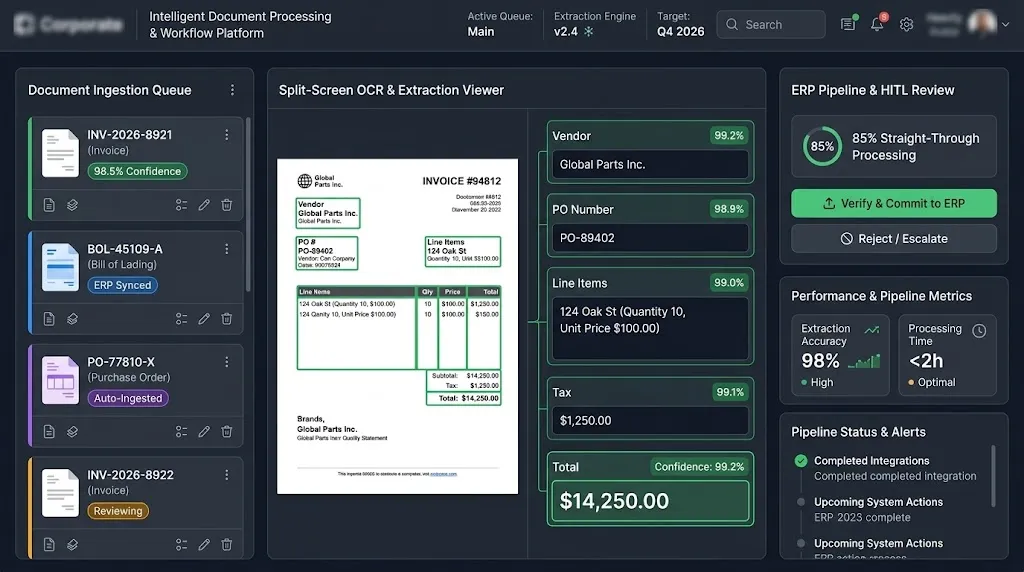
Accelerated vendor invoice processing from 48 hours to under 2 hours.
Most inbound documents ingest and post directly to accounting without manual touchpoints.
Multi-layer validation rules virtually eliminated duplicate payments and typo errors.
Automated reconciliation removed manual document backlogs across all regional hubs.
Scalable cloud-native architecture processed surge-volume paperwork without performance lag.
Talk to our teamBy combining custom document AI models with automated ERP integration and a human-in-the-loop review queue, the distributor eliminated repetitive data entry while maintaining rigorous data accuracy. The project illustrates how Acesoft’s custom AI development services streamline manual document operations, reduce transactional overhead, and build reliable, scalable foundations for digital enterprise workflows.
FAQ
Want this scoped to your systems? A solution architect will walk through the task with you.
Book a free consultationNatural language applications, computer vision, predictive analytics, and custom AI software shaped to the business.
No. Chatbots and virtual assistants are one language offering. We also build vision, forecasting, and industry-specific applications.
We use security protocols and encryption so confidential information stays protected, and we work as an ISO 27001 certified team.
No. We integrate with the systems you already run. Replacement is a separate decision, and only when you ask for it.
You do. The engagement includes handover so your team can operate what we built.
Yes. A dedicated AI team can join your process. That engagement is scoped on its own page if you want people rather than a fixed build.
Strategy, agents, knowledge, security, healthcare, automation, and modernization each have their own page.
Let's talk
Tell us what you are working on. A solution architect will reply with a free consultation, usually within one business day.
 Got an idea? Let's talk